
TEI Critical Apparatus Toolbox: Web-based tools for ongoing XML-TEI editions
DOI: 10.18716/ride.a.15.4
Abstract
Despite the flexibility that a TEI-based workflow offers for preparing editions based on collating several manuscripts, textual scholars working with XML-TEI edition files face a lack of domain-specific auxiliary tools. The TEI-CAT partially fills this gap by providing interfaces for visualizing the transcription of different manuscripts and for exploring the encoded variations and detecting common mistakes. While not properly supporting several types of textual variation and editorial intervention, these tools satisfy most of the needs usually arising during transcription and collation. The image annotation tool complements them by allowing users to generate TEI-compliant code. This tool very flexibly describes or comments on facsimile layout and content and thus is particularly helpful in preparing digital editions. Finally, the PDF-via-LaTeX exporting facility extends the scope of the toolbox towards traditional paper-based publishing, which often remains an editor’s ultimate goal. However, this tool requires adopting specific encoding practices, which are not made explicit and may not match the user’s choices; its output needs manual modifications in some cases. Together, these tools partially illustrate how the XML-TEI format can be used to prepare critical editions. They constitute an important step towards creating a TEI-based digital environment in this field.
General presentation of the TEI-CAT
Intellectual and practical scope
Regardless of their purpose and method, scholars preparing critical editions (whether “Lachmannian”, “Bedierist” or focused on the study of textual tradition) often have to register, summarize and account for textual variations across several manuscripts and citations. To date, two approaches have been prevalent. The first one involves entering variations in a collation table, either in a notebook or a spreadsheet, and manually redacting the critical text and the critical apparatuses with a word processor or in a TeX file. The second approach involves using specialized software* that provides a unified interface and various auxiliary tools in order to support the editing process from transcribing to exporting the definitive files.
Such all-in-one applications have undeniable advantages. However, apart from TUSTEP (Universität Tübingen 1966–2020), which includes a general-purpose text editor and a full scripting language,* most applications comprise a predefined set of features that the user can hardly extend and that complicate exchanging data with other software — at best, users can export their work for further processing with another software, whose output cannot be reimported and reworked without losing information.* For instance, Pinche (2021) relies on the annotation of places, personal names and punctuation marks in the edited text in a detailed and structured way. Other examples involve linguistic tagging or describing the shape of letters and abbreviations. This limitation requires performing such tasks after establishing the critical text, which is not always optimal. A workflow based on a TEI-XML encoded file (as described in Andrews 2009, 34–74) is highly suited to addressing such needs.
When using the TEI (Text Encoding Initiative) encoding standard (TEI Consortium 2021)*, which addresses a wide range of needs and provides extension and specialization mechanisms, scholars are virtually unlimited in determining the data structure of their edition file. This is the case because XML-TEI files only contain structured information. As such, they are not meant to be consulted directly by readers but processed by an external programme to produce, for instance, word processor files (to be sent to a publisher), electronic editions (displayed in a web browser), or even work files (e. g. tables containing all variant readings). XSLT (Kay 2017), a language designed to perform transformations on XML files with the help of stylesheets, is often used to that end (for an example, see Vaughan 2021). Separating the recording of variants and the redaction of apparatus entries, which is delegated to further processing (in contrast, notably, to CTE, Hagel 1997–2021), also ensures a homogeneous syntax in the critical apparatus (see code example 1) and permits its adaptation to the publisher’s requirements by modifying the transformation stylesheet. On the one hand, this requires time and programming skills, but on the other it enables recording a lot of information in a single XML file, only part of which will be used and preserved in every output.
<TEI xmlns="http://www.tei-c.org/ns/1.0"><teiHeader> [...] <bibl source="https://www.augustinus.it/latino/cdd/cdd_17.htm"/> [...]</teiHeader> <text> [...] <body> <p xml:lang="la">Et quia in prophetia vox eius agnoscitur: <seg xml:id="cit1">Non <app> <lem wit="#A" cert="high">derelinques</lem> <rdg wit="#B #C" type="grammatical">derelinquas</rdg> </app> animam meam in inferno</seg>, <seg xml:id="cit2"><app> <lem wit="#A #C" cert="high">eumdem</lem> <rdg wit="#B" cause="haplography">eum</rdg> </app> deduxit ad inferos et reduxit</seg>.</p> </body> <standOff type="references"> <spanGrp type="biblicalReferences"> <span target="#cit1"> <ref type="literal" cRef="Ps 15:10"/> <ref type="allusive" cRef="Ac 2:27"/> </span> <span target="#cit2"> <ref type="allusive" cRef="Ac 2:31"/> </span> </spanGrp> </standOff> </text></TEI>However, while users might appreciate being able to write custom programmes to address specific needs, they benefit from performing common tasks with existing general-purpose tools. Unfortunately, few applications are directed towards critical editing based on XML-TEI and mostly provide interfaces for visualizing achieved editions.* What distinguishes the TEI-CAT is that it provides a set of tools for work in progress. Moreover, contrary to publication software, the two main tools in this toolbox deal almost exclusively with textual variation, which most editors will likely encode in the same way,* and simply ignore more project-specific features. Overall, then, the TEI-CAT truly contributes to developing common tools for common tasks.
Development of the TEI-CAT tools
The TEI-CAT (originally called TEI Critical Edition Toolbox) was opened for testing in June 2014.* It has been programmed almost entirely by Marjorie Burghart, a medieval Latin philologist, who felt that the existing tools for interacting with XML-TEI editions lacked either sufficient support for the TEI “Critical Apparatus” module or features required to work on ongoing projects (e. g. automatic error detection). To overcome this shortcoming, Burghart decided to make available the scripts that she had written for herself (Burghart 2019). This initiative has been part of her broader commitment to making XML-TEI based solutions for critical editing more widely known and accessible. As a member of the TEI Consortium’s Critical Apparatus Workgroup, she has also contributed to improving standards. She has also helped create an online course and a free ebook on encoding critical editions with the TEI (Burghart, Cummings, and Pierazzo 2017).
Originally, the TEI-CAT consisted of two interfaces, which still exist today. Besides conforming to XML and TEI specifications, Check your encoding also helps screen apparatus entries for e. g. the absence of a required witness or the mention of two readings for the same witness. Display parallel versions exhibits the critical text and the texts of selected witnesses, thus facilitating the verification of collation against every manuscript and the examination of variants. Both interfaces insert anchors in the displayed text that make the individual apparatus entries accessible. What follows refers to these interfaces as the core tools of the TEI-CAT, not only because they were released first, but also because they match the needs of all editors using TEI.
The TEI-CAT has benefited from scholars and students collaborating on its development during two hackathons and a training week in 2015 and 2016. Some new features have been worked on at that time (Burghart 2019). Whereas these have never been released, Burghart has published three additional tools. (1) A tool for generating TEI <zone> elements from an image was added in 2017, designed by Chris Sparks (Sparks 2017). Two others followed in 2018: (2) an interface for generating a traditional print edition from an XML-TEI file; (3) a tool for displaying statistics about the XML elements used. In September 2021, a new version of Annotate an image was released (Sparks and Vaňková 2017–2019). As this timeline suggests, and as Burghart has confirmed, project changes result mainly from user suggestions, contributions and requests.
Architecture and infrastructure
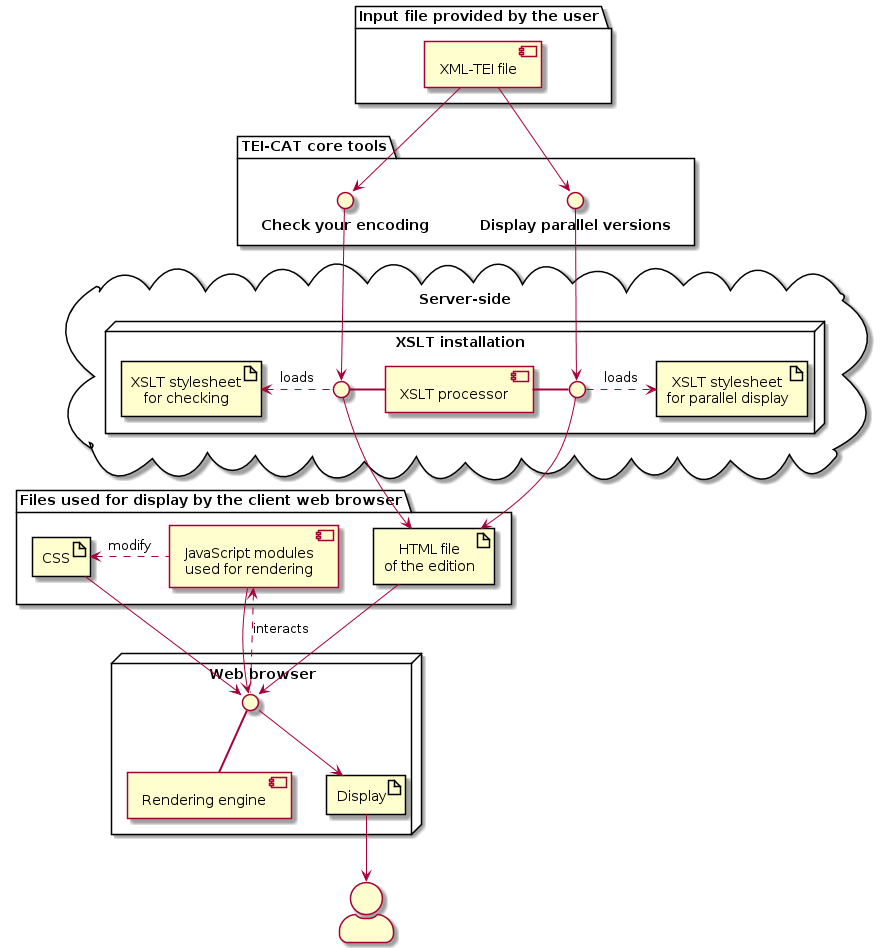
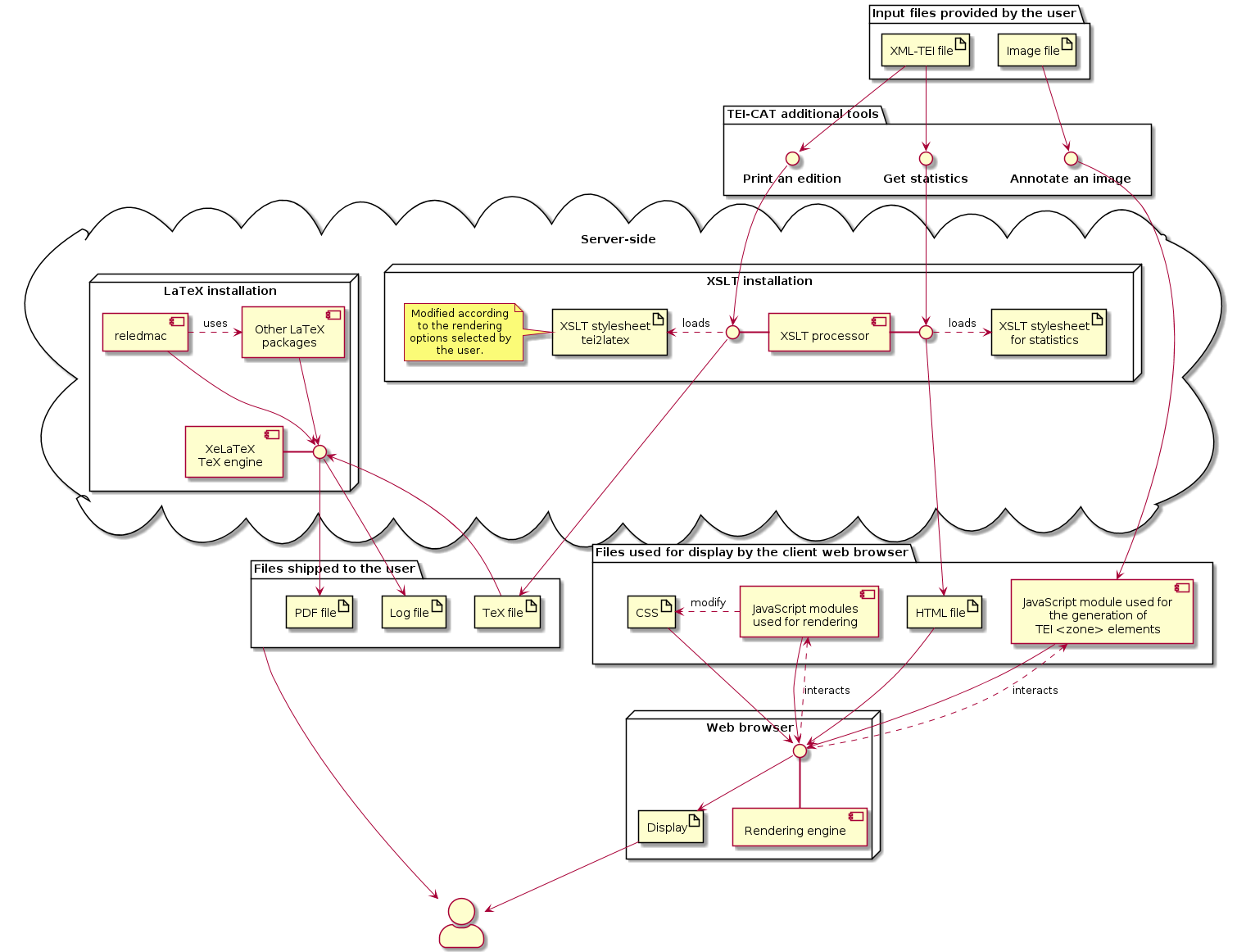
Generally speaking (see fig. 1 and fig. 2), the XML-TEI file uploaded by the user is processed by an XSLT processor using the appropriate stylesheets. The generated HTML files are rendered by the browser with the help of the CSS and JavaScript files retrieved from the server. However, two tools depart from this path to some extent. Relying exclusively on a JavaScript program called TEI Zoner, Annotate an image does not involve any server-side processing: the programme is executed directly in the user’s web browser. As for Print an edition, the XSLT processor generates a TeX file, taking into account user options. This TeX file is then processed on the server by a LaTeX engine, which outputs a PDF and a log file. Finally, all three files are bundled into a ZIP archive, which is shipped to the user. The choice of LaTeX is motivated by the fact that, being based on TeX, it produces PDF files of very good typographic quality. It can also be used together with reledmac, a package specifically designed for printing critical editions (Rouquette 2011–2021; reviewed in Dunning 2020, who also provides a general introduction to LaTeX).* Finally, it enables the user to manually adjust the automatically generated TeX file and to process it with a local LaTeX installation.
Usually, all tools return their output after some seconds. They can even handle rather long and complex editions,* provided that not too many witnesses are selected at a time. The printing tool may take longer, depending on the time needed by LaTeX to compile the PDF file.
Evaluation
Methodology
Given that the core tools share a similar interface and common features (e. g. the generation of the critical text), I review them together. To that end, I have used the test file provided by Marjorie Burghart,* which documents part of the behaviour of the core tools. However, being a sample file rather than a comprehensive test input, it does not address some usual textual phenomena (e. g. blank spaces, duplication of words, transposition of whole segments). The same could be said of a handful of frequent encoding features such as the presence of XML elements (e. g. <abbr>) in a <lem> element. To supplement it, I have written a set of additional tests.
All the test files, along with a list of the tested features and the detailed results, can be retrieved from Zenodo. * For each set of tools, I first comment on the interface and then synthesize the outcome of my tests.
Core tools: Checking and visualizing ongoing editions
The interface is simple, intuitive and well-described on the help page. The user uploads the XML-TEI file. Then, in Display parallel versions, he or she selects the texts to be compared (the critical text and/or one or more witnesses). Texts are displayed side by side (see fig. 3). Every variation is marked by an anchor, which can be clicked to display the corresponding apparatus entry. Editorial notes (in <note> elements) are rendered as well. In the witness text, passages containing variant readings are highlighted in different colours according to the relationship between the displayed text and the lemma.
Hence, Display parallel versions addresses the needs of any editor working with several manuscripts. Indeed, it is easier to check transcription accuracy from a continuous text than from the XML-TEI file or even from a collation table. Variant highlighting provides a general idea of the differences between manuscripts before studying them in greater detail and helps study their peculiarities.
In Check your encoding, only the critical text appears, exactly as in Display parallel versions. The user can dynamically select which encoding anomalies or broader features should be highlighted. Especially appreciated is the ability to highlight those apparatus entries in which some witnesses are missing or recorded twice: these anomalies appear quite frequently, often due to a siglum having been mistyped. Other most common mistakes are tracked too, such as forgetting to define the critical text in a variant location.
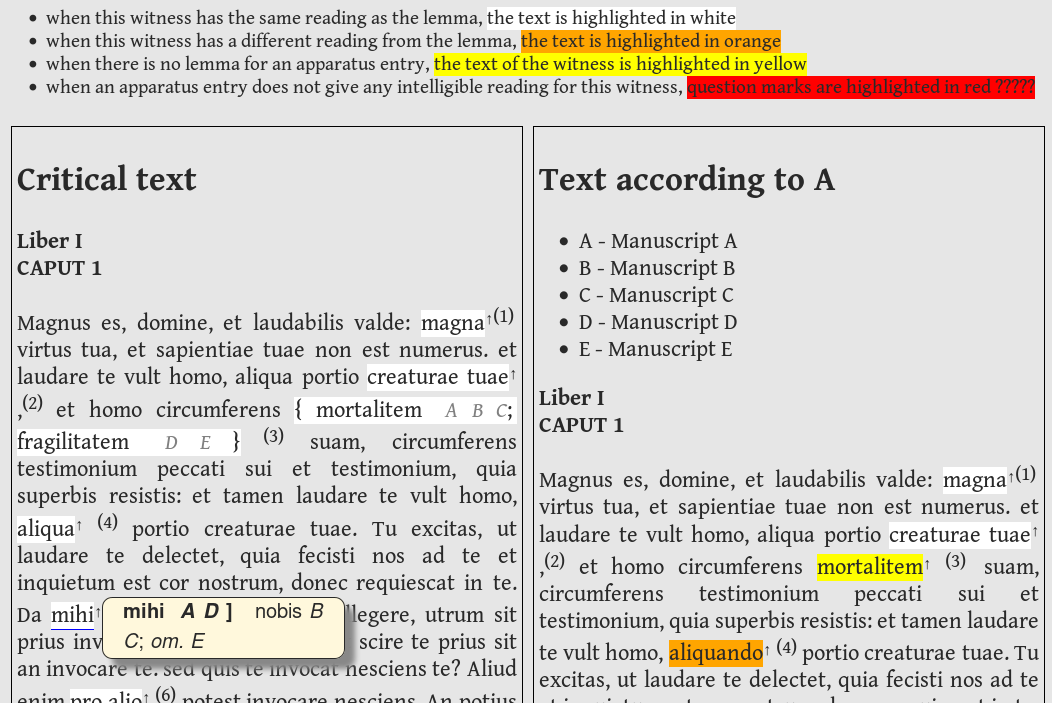
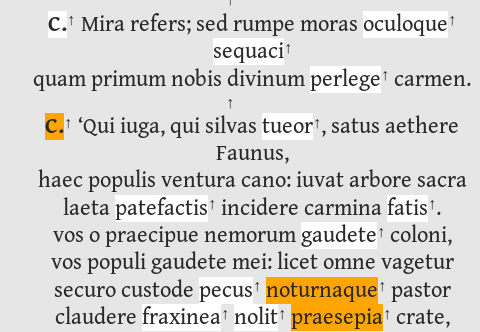
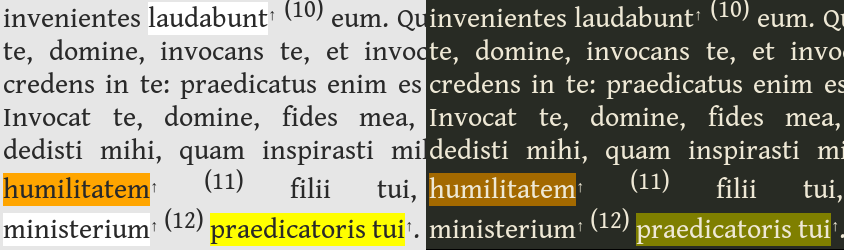
Some small but significant improvements could be made to the interface, which is otherwise rather appealing and readable. Texts are not aligned in parallel display (see fig. 3 shows). The interface could be made a little more interactive, especially by enabling the user to change column width (fig. 4 illustrates why). The white background used to highlight those places where the displayed text is identical with the lemma becomes invisible when dark mode is activated (see fig. 5): replacing it with a lightly coloured background would resolve the issue.
The interface could provide additional information. For instance, according to the help page, “in the toolbox, you will have the option of showing or hiding the page breaks, either all of them, or for a particular witness.” However, the required checkboxes only appear in Check your encoding. In Display parallel versions, page breaks in manuscripts are currently recorded in the HTML file produced by the TEI-CAT as spans with class .msPb but are not displayed. Furthermore, the <said> element, which delimits direct or reported speech, is currently not supported. Since identifying such passages often relies on the editor’s interpretation, highlighting them at least in the critical text would help review the choices that have been made in these respects.
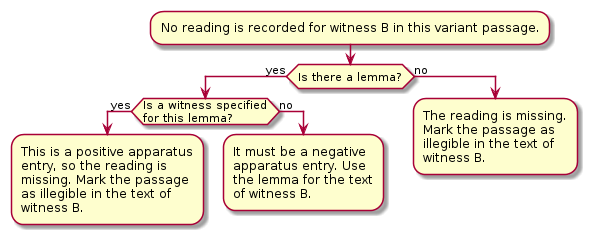
As advertised, the core tools effectively support either positive or negative apparatus entries: fig. 6 illustrates what kind of heuristics the stylesheet uses to handle ambiguous cases. However, it would seem more logical to determine the convention followed at the file level rather than for every apparatus entry. In files encoded with a positive apparatus, this would permit highlighting passages where the critical text is not attested in any manuscript and thus results from the editor’s reconstruction. However, Check your encoding partly offsets this shortcoming by highlighting those variant locations where the readings of selected witnesses are missing.
Regarding the recognition of textual features, only two cases documented in the sample file provided by the author are poorly handled. Variants inside a group (<rdgGrp> element) are marked as illegible in the corresponding witness texts. When a given witness is attributed to both the lemma and a variant reading in the same passage, its text in parallel display reproduces that of the lemma instead of indicating an error.
Conversely, the core tools fail the majority of the supplementary tests. This comes as no surprise, since these tests mostly concern features not stated as supported by the documentation, namely, the help page and Burghart’s test file. Supported undocumented features include the correct display of right-to-left alphabets, XML elements inside a <lem>, additions, transposed text segments (although the apparatus yields strange results), scribal abbreviations in the lemma or outside a variant location. Unsupported or buggy features include the indication of blank spaces, duplication of expressions or, among possible mistakes, the use of a witness in contexts where this should remain unmentioned (e. g. in a lacuna). However, these shortcomings do not prevent using these tools, since at least the displayed text is generally correct or understandable.
Additional tools: Annotating an image and generating a traditional PDF edition
The basic version of Annotate an image lets the user swiftly and easily draw zones on an image and export their coordinates in TEI format. However, it always displays the image in full size, which can be problematic with high-quality reproductions. Nor can the zone be adjusted once drawn. The basic version has been superseded by the new version, which enables scaling images, as well as moving and deleting zones individually. The added features allow categorizing and annotating zones. The help message is very clear and comprehensive. Although I have not used this tool in real projects, it would seem very helpful for those wishing to include annotations linked to manuscript images in their XML-TEI file (e. g. to publish an electronic edition displaying interactive images alongside the text).
At first sight, Print an edition looks very attractive. Besides relieving editors of the burden of programming a very complex XSLT stylesheet, the TEI-to-LaTeX transformation provides numerous options for page layout, the formatting of the critical apparatus, the indices, etc. It supports a two-level apparatus containing variant readings and sources. Taken together, the sample file and the indications in the customization interface provide much information about the supported encoding. Those needing further customization can download and modify the XSLT stylesheet (used to process the XML file). This, of course, requires understanding both XSLT and LaTeX, especially reledmac.
However, it supports neither variant locations nested in variant readings nor explicitly encoded duplications nor transposed spans of text (i. e. neither iter. nor transp. can be generated in the critical apparatus: the entire contents of each reading is written out instead). Besides, very long chunks of complicated and sometimes duplicated code make the default XSLT stylesheet difficult to read and modify. Nevertheless, users dissatisfied with the output can use the generated LaTeX file as a basis and modify it by hand. Even those who wish to implement their own stylesheets may benefit from studying Burghart’s sheet.
Although perhaps beyond the scope of a single-person project, Print an edition might serve to more broadly reflect on how to most practically express traditional paper-based editions in form of an XML-TEI model, ideally embodied in a constraining RNG schema. A consensual, well-designed set of conventions with explicit theoretical, albeit traditional foundations, would be suitable for many projects, and would prevent their authors from reinventing the wheel. Such a specification could also be appropriated by other editing and publishing software in the field of textual criticism providing XML-TEI output (Pierazzo 2019; this approach is exemplified by Camps 2016).
Admittedly, programming a more feature-rich and yet reliable set of stylesheets would be a fairly complex and difficult endeavour. However, some design decisions could make this somewhat easier. First, a comprehensive test suite would permit tracking the progress made in supporting the designed model and ensure that no modification introduces bugs. Secondly, the respective responsibilities of the XSLT stylesheet and of LaTeX macros could be better defined. Currently, for a PDF output similar to fig. 7, XSLT generates the type of code as shown in example 2, which mixes structural commands (e. g. \edtext or \pstart ... \pend) and formatting instructions (e. g. \vspace).
\pstart Libero justo laoreet sit amet. In \edtext{pellentesque}{\lemma{pellentesque} \Afootnote{pellemque \emph{T}, pelles\emph{P}}} massa placerat duis.\pend \vspace{0.1cm}\pstart Vel elit scelerisque mauris pellentesque pulvinarpellentesque habitant. Velit egestas dui id ornare arcu odiout sem. \edtext{Venenatis urna cursus eget nunc scelerisqueviverra. Eu volutpat odio facilisis mauris sit amet massavitae.}{\lemma{}\Bfootnote[nosep]{Augustin, \emph{En. in Ps.},37, 3 (PL 36, 397; CCSL, 38, 384)}}\pend \vspace{0.1cm}This could be made more manageable by using high-level structural commands (see code example 3):*
\edparagraph{Libero justo laoreet sit amet. In\variantLocation{pellentesque}{}{\variant{pellemque}{T}\variant{pelles}{P}} massa placerat duis.}\edparagraph{Vel elit scelerisque mauris pellentesque pulvinarpellentesque habitant. Velit egestas dui id ornare arcu odiout sem. \citing{Venenatis urna cursus eget nunc scelerisqueviverra. Eu volutpat odio facilisis mauris sit amet massavitae.}{\reference{Augustin, \emph{En. in Ps.}, 37, 3 (PL 36,397; CCSL, 38, 384)}}}These commands could be defined in a separate package file as shown in example 4.
\usepackage{reledmac}\usepackage{etoolbox}\newcommand{\edparagraph}[1]{\pstart #1 \pend\vspace{0.1cm}}\newif\ifExistsPrecedingVariation\newif\ifExistsPrecedingRef\newcommand{\variantLocation}[3]{% \ExistsPrecedingVariationfalse \edtext{#1}{% \lemma{% \ifstrequal{#2}{}{#1}{#2}% }% \Afootnote{#3}% }%}\newcommand{\variant}[2]{% \ifExistsPrecedingVariation{, }\fi #1 \emph{#2}% \ExistsPrecedingVariationtrue%}\newcommand{\citing}[2]{% \ExistsPrecedingReffalse \edtext{#1}{% \lemma{}% \Bfootnote[nosep]{#2}% }%}\newcommand{\reference}[1]{% \ifExistsPrecedingRef{, }\fi% #1% \ExistsPrecedingReftrue%}Conceivably, such a LaTeX package could provide some customization options. These could be set in a file generated by the XSLT processor and imported by the main LaTeX file. This would make the XSLT stylesheet more manageable, since it would have to deal only with structure, not with formatting. Later, this would also make it easier to introduce support for ekdosis (Alessi 2020–2021). On the XSLT side, this would only require some additions, to reflect new features, with most of the implementation being done in the package. Needless to say, these are prospective considerations, not actual requirements for TEI-CAT.
Conclusion
The TEI-CAT is an important step towards creating a digital ecosystem for critical editing based on XML-TEI. By displaying the recorded text of every witness, Display parallel versions enables checking conformity to the manuscript. It also enables the user to visualize apparatus entries. Check your encoding points out possible mistakes or typos in the encoding. Although they do not replace XML editors or the potential use of transcription and collation software, these tools can make transcribing, collating and editing more efficient and more reliable. In sum, they provide the editor with views that help control and interpret data. Get statistics, which provides information about XML element use and word count, fits in well with this perspective.
Annotate an image and Print an edition go beyond the production of textual data. The former considerably facilitates linking text and image and as such is oriented more towards producing a digital edition. The latter is modeled on traditional print editions. Users who do not follow the exact same encoding model and feel that some features are missing can modify the stylesheet or rework its LaTeX output. They may thus still gain time compared to writing their own stylesheets from scratch.
On the whole, Marjorie Burghart’s work can be characterized as a pioneering general-purpose toolbox that contributes to reducing the need for programming project-specific tools while setting up TEI-based editing workflows. One can only be grateful to her for making her personal scripts available. Yet, beyond TEI-CAT, significant work remains to be done to create a complete environment. First, in reconstructing the transmission history and the critical text, it would be helpful to be able to explore textual variations in tabular form, with support for sorting, weighting and generating reports. Secondly, unified interfaces for exporting to PDF, DOCX, ODT or HTML would greatly facilitate the publication process. A specialized XML editor, or specific configurations for existing ones, could also make complex source files more manageable.
To these ends, some existing components could be built on, such as the TEI processing model implemented in the TEI Publisher (2016–2021) or the latter’s annotation editor. However, creating an environment of interoperable software is likely to be hindered, at least for the moment, by the absence of a recognized standard about how to express textual variation using the rich and rather permissive TEI vocabulary. Marjorie Burghart and her TEI-CAT might well play a role in this respect in the future, either directly or as a source of inspiration.